 IonWarp
1. IonWarp
Best for: GitHub teams that want security, SOC 2 and CI/CD review next to code review
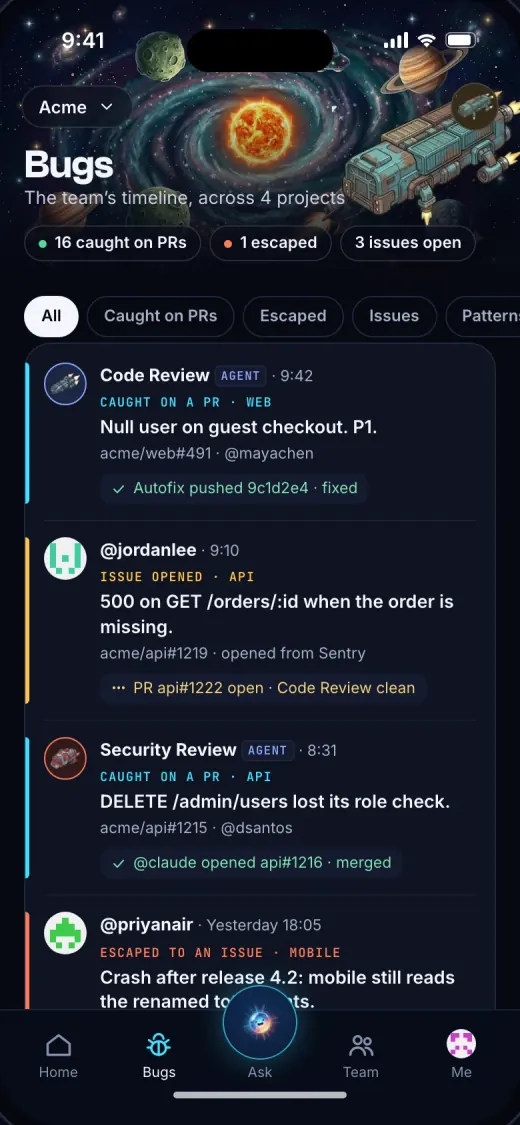
IonWarp is a GitHub App. On each pull request it runs the reviewers you turn on for that project: Code Review, Security, AI Architecture, Log & Errors, Docs, API Performance, SOC 2 and CI/CD. It posts one comment with each finding on its line, a severity from P0 to P2, why it matters, and a fix prompt for Claude Code, Cursor or Codex. The app also tracks each project’s two loops: first prompt to pull request, and push to merge.
Price. Pro is $49 a month for a workspace with 5 seats and $25 of review spend included. Max is $149 with 10 seats and $100. You set a monthly budget and IonWarp stays inside it. Every workspace starts with a 14-day trial of every reviewer, no card.[2]
- Reviewers for SOC 2 controls and CI/CD pipelines beside code review and security. No other app has a row on those two benchmark lanes.
- One price per workspace. 5 people on Pro pay $49 in all, not $49 each.
- iPhone and Android apps for the day’s standup, the bugs your reviewers caught, and each project’s loops.[4][5]
- Read-only access to your code. It never pushes a commit.[3]
- GitHub only: no GitLab, Bitbucket or Azure DevOps, and no self-hosting.
- No free plan once the trial ends.
- Its Code Review F1 on our benchmark is 49.2%, behind Qodo, Cursor Bugbot and Greptile. Its median review takes 6m 56s, slower than Greptile and Qodo.
Who it’s for: pick it if you’re on GitHub, you want more than one kind of review on each pull request, and you want to see it on your phone.
2. GitHub Copilot code review
Best for: Teams already paying for GitHub Copilot · github.com
GitHub’s own reviewer. Ask Copilot for a review on a pull request, or turn on automatic reviews for a repository, and it leaves review comments like a teammate. It works on GitHub.com, in GitHub Mobile and the GitHub CLI, in VS Code, Visual Studio, Xcode and JetBrains IDEs, and on Azure DevOps.[7]
Price. Pull request reviews come with Copilot Pro at $10 a user a month (with $15 of AI credits), Pro+ at $39 and Max at $100.[6] Each review spends credits: GitHub puts the average at $0.25 on Lite, $1.50 on Balanced and $10 on Max, and the agentic part runs on GitHub Actions minutes. On Copilot Business and Enterprise, an organization can let members without a license use it.[7]
- Usage-based: a month of big pull requests costs more, and Actions minutes add to it.
- One general reviewer, not specialists.
- Not in our benchmark, so we can’t tell you how it scores against the others.
Who it’s for: pick it if your team has Copilot seats and wants a first pass on every pull request without another vendor.
3. CodeRabbit
Best for: Open-source projects, and teams on GitLab, Bitbucket or Azure DevOps · coderabbit.ai
CodeRabbit reviews pull requests on GitHub, GitLab, Azure DevOps and Bitbucket, including self-hosted versions.[12] The same reviewer runs in VS Code, the CLI and coding-agent loops before a pull request exists.[10]
Price. Essentials is $24 per developer a month billed annually or $30 month to month, Team is $48 or $60, Advanced $72 or $90, and Enterprise is custom. The Free plan covers every repository but only summarizes pull requests. Open-source projects get Team features on public repositories at no cost. New organizations start with a 14-day trial.[11]
- 194 of its findings matched no known issue, the most of any app, so expect to dismiss some.
- Per-developer pricing grows with the team.
- The free plan doesn’t review pull requests.
Who it’s for: pick it if you maintain open source, or your code isn’t only on GitHub.
4. Greptile
Best for: Solo developers, and teams that don’t want seat fees · greptile.com
Greptile reviews pull requests with context from your whole codebase. Connect GitHub or GitLab, turn on repositories, and it reviews each new pull request.[16]
Price. Starter is free for one developer with 50 credits a month. Pro has no seat fee: credits cost $1 each and are shared across the organization. A Base review is 1 credit, Plus 3, Apex 10.[13] On Auto, Greptile picks the tier for each pull request from its size, risk and complexity.[14] Only completed reviews spend credits, and new reviews pause when credits run out unless automatic recharge is on.[15] Open-source projects and early startups can apply for free credits.[13]
- The free plan does real pull request reviews.
- No seat fee, so adding developers costs nothing.
- Fastest median review on our benchmark (4m 58s), with an F1 of 51.1%.
- What a pull request costs depends on the tier it gets.
- Reviews stop when the balance hits zero, unless recharge is on.
- Self-hosting and Bitbucket Data Center are Enterprise only.[13]
Who it’s for: pick it if you’re one developer, or your team would rather pay for reviews than for people.
5. Qodo
Best for: Teams that want the highest catch rate we measured, or on-prem · qodo.ai
Qodo reviews pull requests on GitHub, GitLab, Bitbucket and Azure DevOps,[18] and runs the same review skills in the IDE before a pull request exists, with a rules system and context across repositories.[17]
Price. Pro Team is a monthly credit pack the team shares, at $0.015 a credit: 2,000 credits (about 14 reviews), 4,000 (about 29) or 16,000 (about 114), so $30, $60 or $240 a month. Past the pack, reviews keep running at the same rate up to a cap you set, and credits expire at the end of each month. The 14-day trial needs no card. Enterprise adds on-prem, Gerrit and your own model keys.[17]
- A bill in credits is harder to predict than a flat price.
- No free plan after the trial.
- 79 of its findings matched no known issue.
Who it’s for: pick it if catching the most bugs matters most to you, or the reviewer has to run on your own servers.
6. Cursor Bugbot
Best for: Teams that already write code in Cursor · cursor.com
Cursor’s reviewer. Once it’s on, it reviews each new pull request and each update in the background, posts a Cursor Bugbot check, and can hand a fix to Cursor’s cloud agents. It works with GitHub, GitLab, Bitbucket and Azure DevOps.[21] Cursor’s iPhone app lets you review pull requests on the go.[22]
Price. Bugbot comes with Cursor Premium ($30 a month or $300 a year), Super ($100) and Ultra ($200), and with Teams seats at $30, $100 or $200.[20] Reviews bill as usage from the plan’s credit, and the docs point to the pricing page for the rate, which listed none when we read it.[21][19] Dry runs, and the learning run when a pull request merges or closes, count like reviews.[21]
- 56 of its findings matched no known issue on our benchmark, the fewest of any app, with an F1 of 51.4%.
- Learns rules from your team’s review history.[21]
- Can hand a fix straight to an agent.
- You pay for a Cursor plan first, then for each review.
- Cursor doesn’t print a per-review price.
- It found fewer known issues than Qodo, CodeRabbit, Greptile and IonWarp.
Who it’s for: pick it if your developers already work in Cursor and you want reviews from the same place.
7. Graphite
Best for: Teams that stack pull requests · graphite.com
Graphite replaces GitHub’s pull request page with its own: stacked pull requests from its CLI, a review inbox, a merge queue, and AI reviews from Graphite Agent.[25] It syncs with your GitHub account, and its site now announces Cursor’s cloud agents inside Graphite.[24]
Price. Hobby is free for personal repositories with limited AI reviews. Starter is $20 per user a month billed annually and adds organization repositories. Team, at $40 per user a month billed annually, adds unlimited AI reviews, review customizations, automations and the merge queue. Enterprise is custom and adds GitHub Enterprise Server.[23]
- The strongest tool here for stacked pull requests.
- Review, merge queue and AI review in one place.
- Free for the first 30 days, no card.[24]
- Unlimited AI reviews start at $40 a user.
- GitHub only, like IonWarp.
- Not in our benchmark, so we don’t score its reviews.
Who it’s for: pick it if your team stacks small pull requests and wants AI review in the same tool.
What our benchmark measured
Our public benchmark runs every reviewer on the same 50 open-source pull requests with 158 known issues, and a judge model matches each comment to a known issue (how we measure). Five of these seven apps are in the release of October 12, 2026. Copilot code review and Graphite aren’t, so we don’t score them.[1]
| F1 | Known issues found | Findings that matched none | Median review | |
|---|---|---|---|---|
| Qodo | F1: 58.5% | Known issues found: 98 of 158 | Findings that matched none: 79 | Median review: 5m 40s |
| Cursor Bugbot | F1: 51.4% | Known issues found: 74 of 158 | Findings that matched none: 56 | Median review: 7m 52s |
| Greptile | F1: 51.1% | Known issues found: 81 of 158 | Findings that matched none: 78 | Median review: 4m 58s |
| IonWarp (DeepSeek V4.1 Flash) | F1: 49.2% | Known issues found: 77 of 158 | Findings that matched none: 78 | Median review: 6m 56s |
| CodeRabbit | F1: 42.1% | Known issues found: 94 of 158 | Findings that matched none: 194 | Median review: 7m 34s |
F1 balances bugs found against comments that matched no known issue. IonWarp’s row is its Code Review reviewer on DeepSeek V4.1 Flash, the model it runs by default. The benchmark is ours, so check it: every pull request, verdict and review is public under CC BY 4.0, and the full Code Review table has every model too.
How we chose
What we required. Each tool reviews GitHub pull requests by itself once it’s installed, shows a price or a free tier on its own site, and is on sale today.
What we checked, on November 20, 2026. We read each vendor’s pricing page and docs for price, free tier and Git hosts, and searched the App Store and Google Play for each app. Accuracy, noise and speed come only from the benchmark above. We ran no new reviews for this page, and we use no ratings or reviews from other sites.
The order. IonWarp is first because we make it, for the reasons at the top. Copilot code review is next, because a team that already pays for Copilot can turn it on today. Then the three standalone review apps, by how much each gives away free: CodeRabbit, Greptile, Qodo. Bugbot and Graphite come last because each needs a Cursor plan or a new pull request workflow.
Sources
- IonWarp benchmark, Code Review: 50 pull requests, 158 known issues (release 2026-10-12), read 2026-11-20.
- IonWarp, Pricing, read 2026-11-20.
- IonWarp, Security: what the GitHub App can read and change, read 2026-11-20.
- App Store, IonWarp: AI Code Review (version 2.0.0), read 2026-11-20.
- Google Play, IonWarp: AI Code Review, read 2026-11-20.
- GitHub, Copilot plans and pricing, read 2026-11-20.
- GitHub Docs, About GitHub Copilot code review, read 2026-11-20.
- App Store, GitHub, read 2026-11-20.
- Google Play, GitHub, read 2026-11-20.
- CodeRabbit, Pricing, read 2026-11-20.
- CodeRabbit docs, Plans and pricing, read 2026-11-20.
- CodeRabbit docs, Git platforms overview, read 2026-11-20.
- Greptile, Pricing, read 2026-11-20.
- Greptile docs, Review tiers, read 2026-11-20.
- Greptile docs, Billing, read 2026-11-20.
- Greptile docs, Introduction, read 2026-11-20.
- Qodo, Plans and pricing, read 2026-11-20.
- Qodo, Git plugin, read 2026-11-20.
- Cursor, Pricing, read 2026-11-20.
- Cursor docs, Models and pricing, read 2026-11-20.
- Cursor docs, Bugbot, read 2026-11-20.
- App Store, Cursor, read 2026-11-20.
- Graphite, Pricing, read 2026-11-20.
- Graphite, Graphite: the AI code review platform, read 2026-11-20.
- Graphite docs, AI Reviews, read 2026-11-20.